

Overview
You can export the data of multiple candidates in a position to a CSV file, which opens in Excel, Google Sheets, or Numbers. Use it to report on your hiring funnel, share scores with someone who doesn’t use Hireflix, archive interview transcripts, or bring results into your own system. You choose exactly which candidates to include, even across different stages, and which extra data to add to the file.Steps
1
Open the position
Go to Positions and open the position that contains the candidates you want to export.
2
Select candidates and click the CSV icon
(1) Hover over a candidate and tick the checkbox in the top-left corner of their profile picture. You can select candidates across different stages in the same position.To select all candidates in a stage at once, click that stage’s tab (for example Shortlisted), then tick the empty checkbox next to the stage name. Want several stages in your export? Repeat this for each stage you want to include.(2) The bar at the bottom of your screen shows how many candidates you’ve selected. Click the file icon with the CSV label to open the CSV Export popup.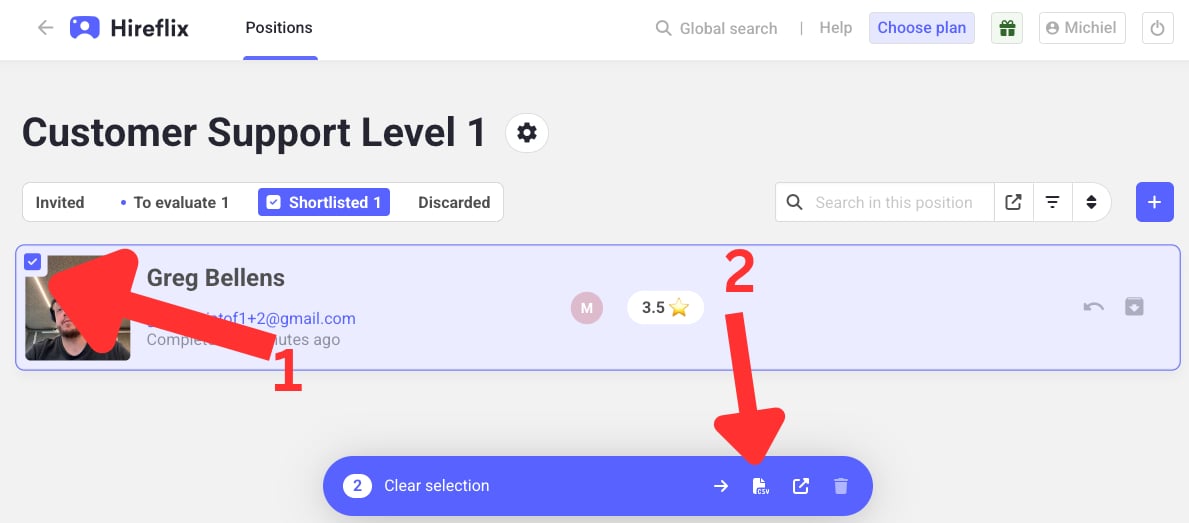
3
Choose extra data (optional)
Turn on any extra data you want to include. All options are optional. If you leave them all off, you still get the standard columns.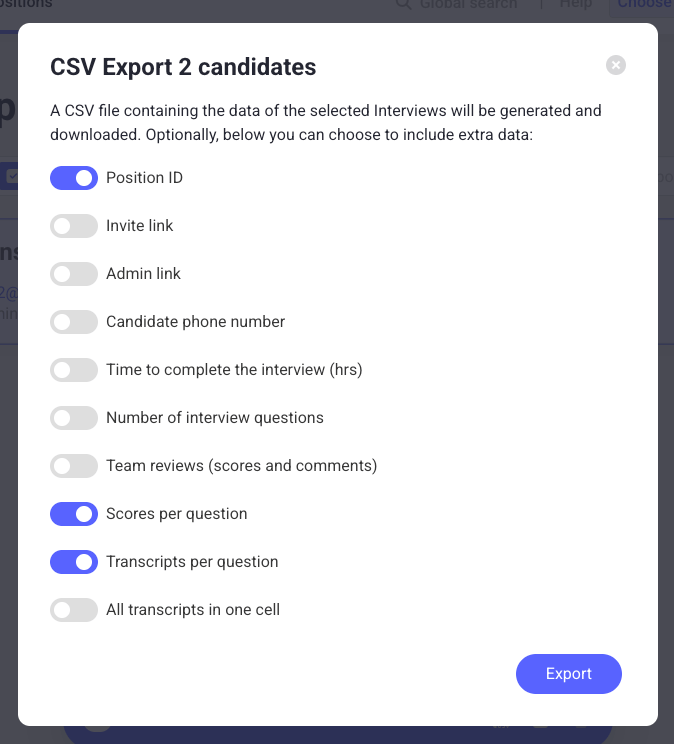
4
Export
Click Export. Hireflix generates the CSV file and your browser downloads it.
What’s in the CSV
Standard columns
Every export includes these columns, whatever options you choose:Optional columns
Each toggle in the export popup adds one or more columns:
The All Transcripts cell lists each question followed by the candidate’s answer:
Example: all options enabled
With every option turned on, the CSV for an interview with two questions has these columns:Learn next?
Bulk download interview videos (API)
Need the interview videos too? Use a ready-made script with the Hireflix API to download every video for a position or your whole account.
Share a single interview
Want someone outside your team to review one candidate? Share a direct link to that candidate’s interview.