

The Hireflix integration with Greenhouse will allow you to trigger one-way video interviews automatically from your Greenhouse account.
Enabling the Greenhouse and Hireflix integration
Enabling the integration takes 1 minute. It is all shown on the video above. The only thing that takes a bit longer is for Greenhouse to activate it. They usually do it in 24/48 hours maximum.-
In Hireflix, go to Integrations, find Greenhouse and click Connect to start the flow.

- Log in to your Greenhouse account and use the support chat to request Greenhouse to activate your integration (the exact steps can be found in the video above).
- You will then get an email from Greenhouse asking you to submit your API key through a safe link.
- Go to Hireflix > Your Account > API Keys and create your API key for Greenhouse.
- Go ahead and submit your API key to Greenhouse through the link they provided you in the email, and they will be then able to activate it for you.
-
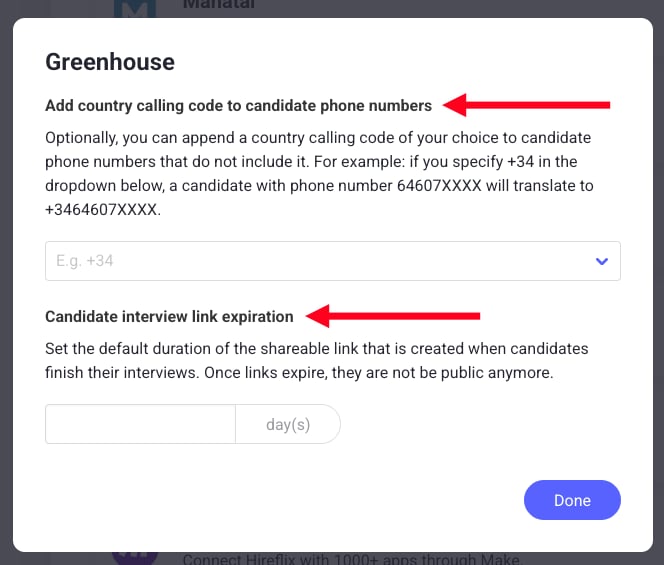
Optional: on the Integrations page, click the cog icon next to the Connect button to open the advanced settings.

- Candidate interview link expiration: how long, in days, the link on the candidate’s profile stays valid. The default is 75 days, and you can set anything from 75 to 10,000 days. The change only applies to new links.
- Add country calling code to candidate phone numbers: adds the country code you choose to candidate phone numbers that don’t include one.
Adding Hireflix as a stage on your Greenhouse Interview plan
Once the Greenhouse/Hireflix integration is enabled, you will then be able to add Hireflix as a stage on your interview plans.Step 1: Adding Hireflix as a stage on your interview plan
- Go to your Greenhouse Position, then Job setup, then Interview Plan, and you will now be able to add Hireflix as a stage.

- Inside of the newly created Hireflix stage you will be able to pick which interview will be triggered for this particular job in that stage. The interviews you will see on the dropdown are the interviews you have created in Hireflix.

Step 2: Inviting Candidates to the interview
As shown in the video above, you can trigger invites individually but also in bulk. Just go to the specific candidate and click Send Test, or select several in bulk, and then do a bulk action for sending the tests (To be able to do the bulk action you need to be using the right filters - This is shown on the video above).
Step 3: Reviewing the responses once a candidate finishes the interview
Once a candidate finishes the interview, a link will automatically be copied to the candidate profile as below. You will be able to click on “View Report” and watch the interview straight away, without the need to log in to Hireflix. By default, that link expires after 75 days, but you can change this in the advanced settings of the integration.