> ## Documentation Index
> Fetch the complete documentation index at: https://hireflixsl.mintlify.site/llms.txt
> Use this file to discover all available pages before exploring further.
# How-to: Sharing an Entire Stage with a Hiring Manager
## Overview
Most of the time, you don't want to share a single interview: you want a hiring manager (or anyone else who should weigh in) to review every candidate who reaches a specific stage of your position, usually the evaluation stage.
With a stage-level shareable link, you share the stage once. From that moment on, any new candidate who completes their interview and lands in that stage is **automatically added to the same link**. The hiring manager keeps using the same URL, and you don't have to reshare anything as new candidates come in.
The link is safe to send outside your team:
* No login or account is required to open it.
* Reviewers can only see the interviews in the stage you shared.
* Reviewers can't see the ratings or comments left by other reviewers.
* You control how long the link stays active and whether reviewers can rate candidates.
## Steps
Go to **Positions** and open the position you want to share candidates from.
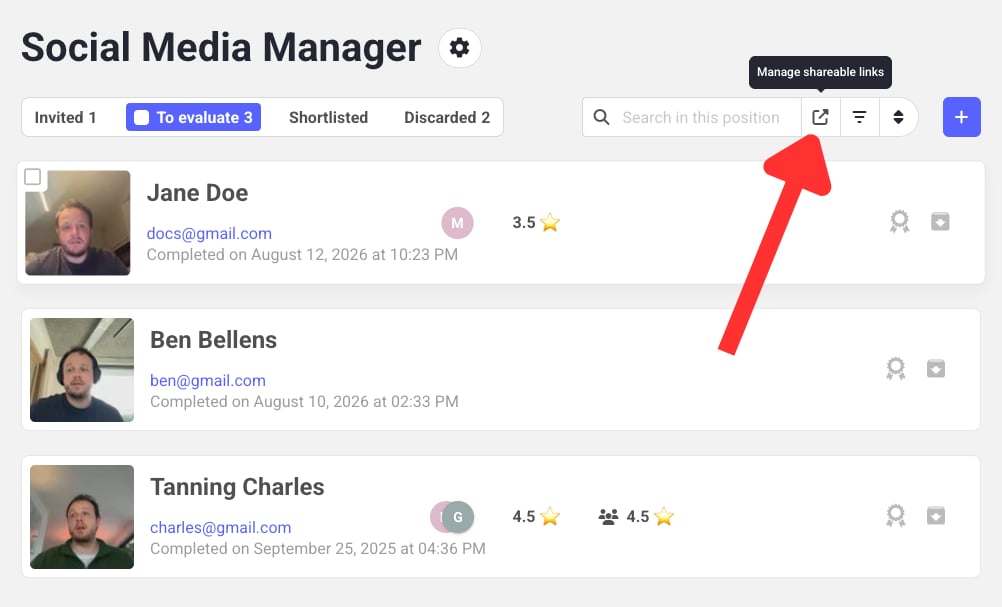
In the top right, above the list of interviews, click the arrow button labeled **Manage shareable links**.
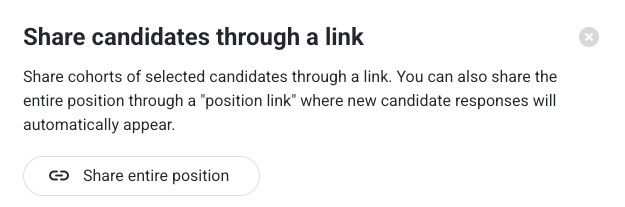
 In the panel that opens, click **Share entire position**.
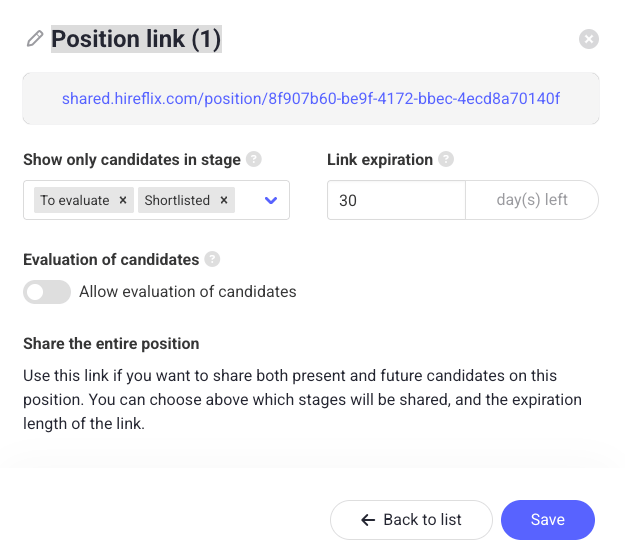
 Fill in the details:
* **Name**: give the link a clear name (for example, *Hiring manager review, To evaluate*) so you can identify it later when you want to update or delete it. You can change it by clicking the label next to the pencil icon.
* **Stage**: pick which stage should be shared. In most cases this is "To evaluate", so the hiring manager only sees candidates who have completed their interview and are ready for review. You can also select multiple stages, like "To evaluate" and "Shortlisted".
* **Link expiration**: set how many days the link should stay active. After that, the link stops working.
* **Allow evaluation**: choose whether reviewers can rate and comment on candidates, or whether the link is view-only.
Don't forget to **click the "Save" button**, otherwise you'll lose your sharing settings.
Fill in the details:
* **Name**: give the link a clear name (for example, *Hiring manager review, To evaluate*) so you can identify it later when you want to update or delete it. You can change it by clicking the label next to the pencil icon.
* **Stage**: pick which stage should be shared. In most cases this is "To evaluate", so the hiring manager only sees candidates who have completed their interview and are ready for review. You can also select multiple stages, like "To evaluate" and "Shortlisted".
* **Link expiration**: set how many days the link should stay active. After that, the link stops working.
* **Allow evaluation**: choose whether reviewers can rate and comment on candidates, or whether the link is view-only.
Don't forget to **click the "Save" button**, otherwise you'll lose your sharing settings.
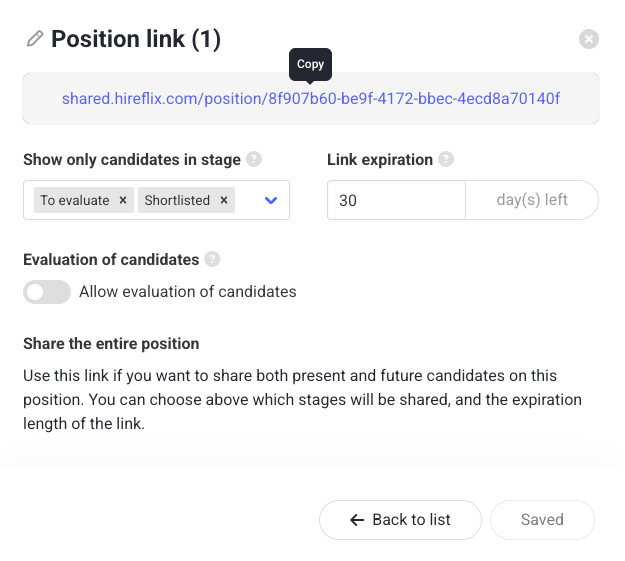
 Copy the generated URL and send it to the hiring manager or anyone else who should review these candidates.
Every new candidate who moves into the selected stage will automatically appear behind the same link, no extra steps required.
Copy the generated URL and send it to the hiring manager or anyone else who should review these candidates.
Every new candidate who moves into the selected stage will automatically appear behind the same link, no extra steps required.
 Because new candidates are added automatically, this is the easiest way to share a position with a hiring manager. There's no need to add each new completed interview to a link manually or resend anything when someone new finishes their interview.
## Managing existing links
You can update or delete any shareable link you created at any time from the same **Manage shareable links** panel in the top right of the position. From there you can rename a link, change its expiration, toggle evaluation, or revoke it entirely. Make sure to correctly label shareable links to avoid confusion!
Prefer to hand-pick which candidates to share? Learn how to bulk share a specific set of interviews.
Because new candidates are added automatically, this is the easiest way to share a position with a hiring manager. There's no need to add each new completed interview to a link manually or resend anything when someone new finishes their interview.
## Managing existing links
You can update or delete any shareable link you created at any time from the same **Manage shareable links** panel in the top right of the position. From there you can rename a link, change its expiration, toggle evaluation, or revoke it entirely. Make sure to correctly label shareable links to avoid confusion!
Prefer to hand-pick which candidates to share? Learn how to bulk share a specific set of interviews.