> ## Documentation Index
> Fetch the complete documentation index at: https://hireflixsl.mintlify.site/llms.txt
> Use this file to discover all available pages before exploring further.
# Notifications & Reply Routing
## Overview
There are two separate systems that decide who gets emailed about a candidate, and it's easy to mix them up:
| | **Interview-completed notifications** | **Candidate reply routing** |
| :----------------------------------------- | :---------------------------------------------------- | :--------------------------------------------------------------------------- |
| Controls | Who's emailed when a candidate completes an interview | Who receives a candidate's reply to an invite, reminder, or completion email |
| Configured per | Position (Internal Notifications) | Email template (Custom reply-to address) |
| Default recipient | The inviter, plus any additional team members you add | The inviter |
| Via ATS, public links, API, or automations | Falls back to the account owner/admin | Falls back to the account owner/admin, unless a custom reply-to is set |
Configuring one of these systems doesn't affect the other. Read on for how each works.
## Interview-completed notifications
Internal notifications determine who receives an email whenever a candidate completes an interview. These settings are configured **separately for each position**.
### Where to find these settings
Open your position/interview.
Click **Configure** (gear icon).
Open the **Internal Notifications** section.
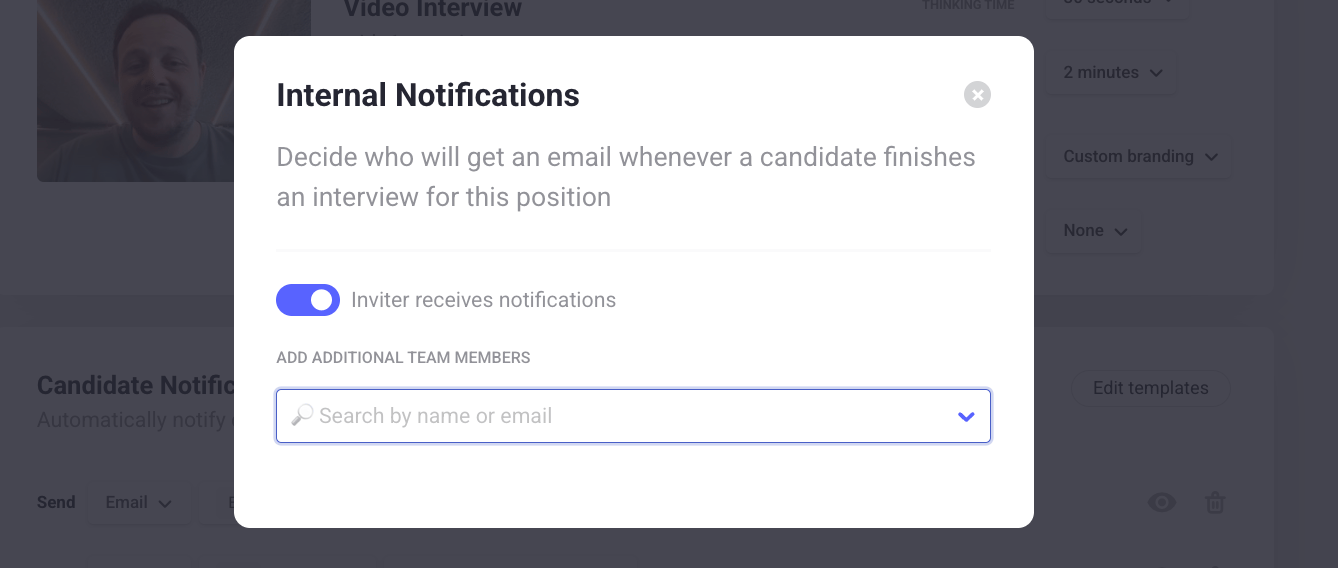
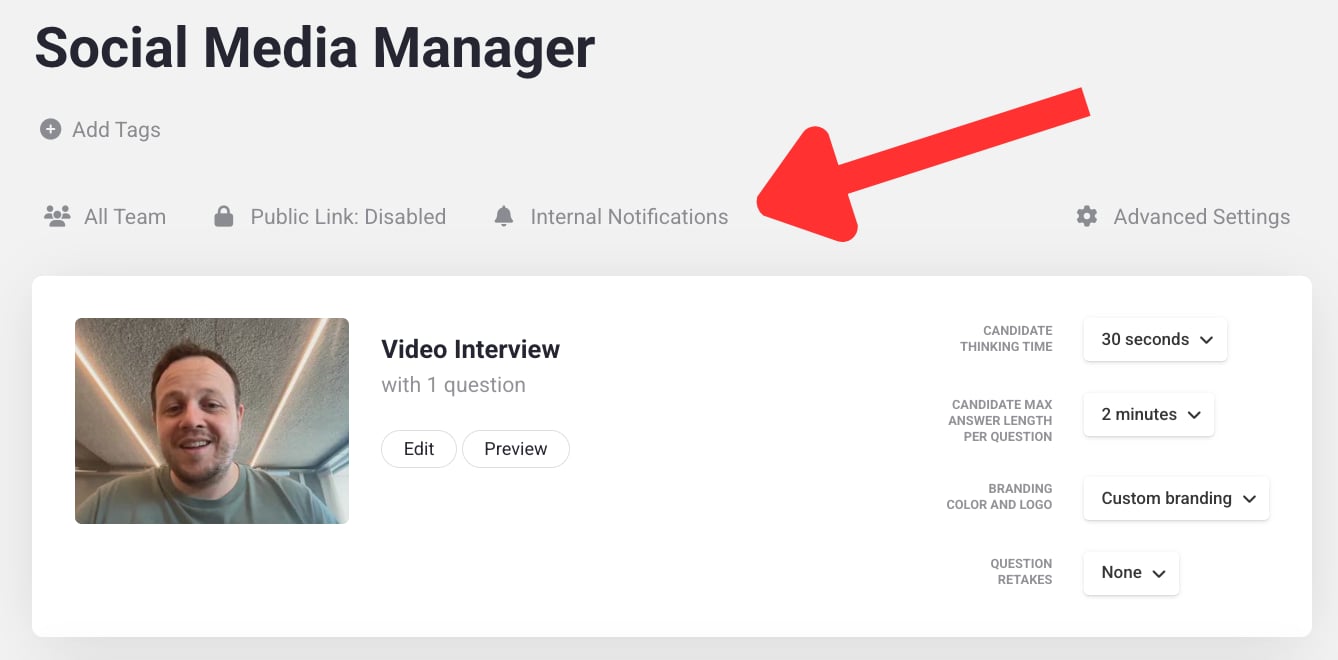 Inside this section, you'll see:
* An **Inviter receives notifications** toggle
* An **Add additional team members** dropdown
Inside this section, you'll see:
* An **Inviter receives notifications** toggle
* An **Add additional team members** dropdown
 ### The inviter
By default, **Inviter receives notifications** is enabled. The user who invited the candidate automatically receives the completion notification.
A user counts as the inviter when they:
* Manually invite candidates from Hireflix
* Import candidates through a CSV or Excel file
The logged-in user performing the action becomes the inviter. This works independently per candidate. For example, if Kim invites one candidate and Laura invites another to the same position, Kim and Laura each receive the notification for the candidate they invited.
### Adding additional team members
The dropdown lets you add team members who should **always** receive notifications for that position, regardless of who invited the candidate. You can add multiple users, and combine this with inviter notifications — you can only select users already added to your Hireflix account.
For example, if Laura is added in the dropdown, she'll always receive completion notifications for that position, even if another recruiter invited the candidate.
### ATS integrations, public links, API, and automations
Things work differently when candidates are invited through a **public link**, an **ATS integration**, the **Hireflix API**, or **Zapier/Make.com automations**. In these cases, Hireflix doesn't know which user should be considered the inviter, so it automatically assigns the **account owner/admin** as the inviter instead.
If **Inviter receives notifications** is enabled, the account owner/admin will receive these notifications. This often surprises teams relying on ATS integrations or public links.
If you mainly use ATS integrations, public links, API invitations, or automations, we recommend:
* Disabling **Inviter receives notifications**
* Manually selecting recipients in the additional team members dropdown
This gives you full control over who receives interview-completed emails.
### Common questions
Yes, add them in the **Additional team members** dropdown for the position.
This usually happens because candidates are being invited through a public link, an ATS integration, the API, or Zapier/Make.com. In these situations, Hireflix automatically assigns the account owner as the inviter.
Disable **Inviter receives notifications**, or remove them from the additional team members dropdown.
## Candidate reply routing
When a candidate replies to an email sent from Hireflix — an interview invite, a reminder, or a completion email — the reply doesn't go to everyone on the team or to the Internal Notifications list above. Instead, Hireflix follows a clear set of rules to decide where that reply lands.
**Short answer:**
* By default, the reply goes to the user who invited the candidate.
* If a **Custom reply-to address** is enabled in the email template, replies go there instead.
* For invites sent via ATS integrations or public links, replies go to the account admin, unless a custom reply-to address is set.
### Using a custom reply-to address
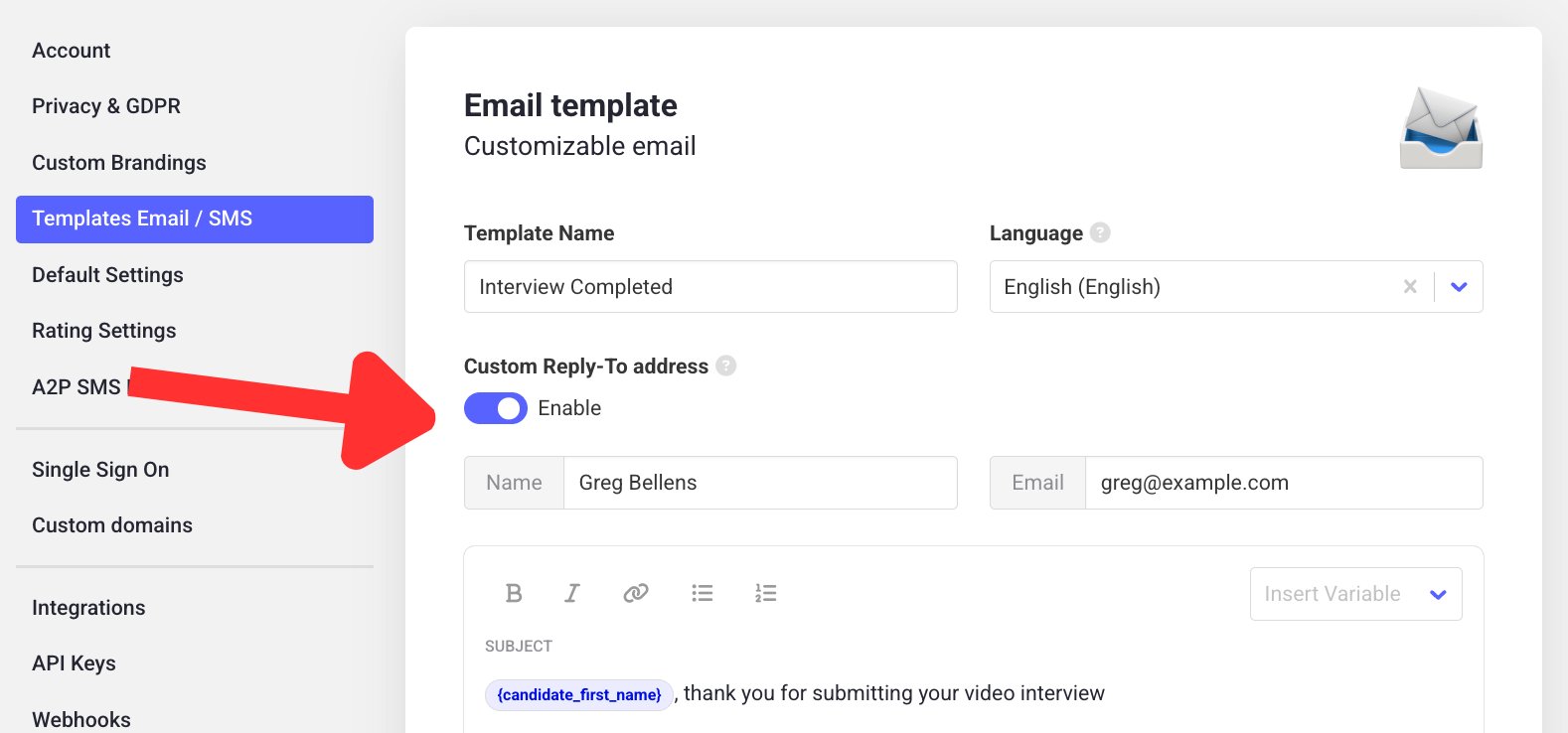
Email templates include an optional **Custom reply-to address** setting. When enabled, all candidate replies to emails using that template go to the specified address instead — regardless of who sent the invite. This is useful when replies should always land in a shared inbox, like `recruitment@company.com` or a central HR inbox.
Go to **Account > Templates Email / SMS**.
Edit the relevant email template.
Enable **Custom reply-to address** and enter the email that should receive replies.
### The inviter
By default, **Inviter receives notifications** is enabled. The user who invited the candidate automatically receives the completion notification.
A user counts as the inviter when they:
* Manually invite candidates from Hireflix
* Import candidates through a CSV or Excel file
The logged-in user performing the action becomes the inviter. This works independently per candidate. For example, if Kim invites one candidate and Laura invites another to the same position, Kim and Laura each receive the notification for the candidate they invited.
### Adding additional team members
The dropdown lets you add team members who should **always** receive notifications for that position, regardless of who invited the candidate. You can add multiple users, and combine this with inviter notifications — you can only select users already added to your Hireflix account.
For example, if Laura is added in the dropdown, she'll always receive completion notifications for that position, even if another recruiter invited the candidate.
### ATS integrations, public links, API, and automations
Things work differently when candidates are invited through a **public link**, an **ATS integration**, the **Hireflix API**, or **Zapier/Make.com automations**. In these cases, Hireflix doesn't know which user should be considered the inviter, so it automatically assigns the **account owner/admin** as the inviter instead.
If **Inviter receives notifications** is enabled, the account owner/admin will receive these notifications. This often surprises teams relying on ATS integrations or public links.
If you mainly use ATS integrations, public links, API invitations, or automations, we recommend:
* Disabling **Inviter receives notifications**
* Manually selecting recipients in the additional team members dropdown
This gives you full control over who receives interview-completed emails.
### Common questions
Yes, add them in the **Additional team members** dropdown for the position.
This usually happens because candidates are being invited through a public link, an ATS integration, the API, or Zapier/Make.com. In these situations, Hireflix automatically assigns the account owner as the inviter.
Disable **Inviter receives notifications**, or remove them from the additional team members dropdown.
## Candidate reply routing
When a candidate replies to an email sent from Hireflix — an interview invite, a reminder, or a completion email — the reply doesn't go to everyone on the team or to the Internal Notifications list above. Instead, Hireflix follows a clear set of rules to decide where that reply lands.
**Short answer:**
* By default, the reply goes to the user who invited the candidate.
* If a **Custom reply-to address** is enabled in the email template, replies go there instead.
* For invites sent via ATS integrations or public links, replies go to the account admin, unless a custom reply-to address is set.
### Using a custom reply-to address
Email templates include an optional **Custom reply-to address** setting. When enabled, all candidate replies to emails using that template go to the specified address instead — regardless of who sent the invite. This is useful when replies should always land in a shared inbox, like `recruitment@company.com` or a central HR inbox.
Go to **Account > Templates Email / SMS**.
Edit the relevant email template.
Enable **Custom reply-to address** and enter the email that should receive replies.
 Save the template.
* Changes to reply settings only affect **new** invites, replies to past invites keep going to the address set at the time.
* Different templates can have different reply-to configurations.
* If replies are landing somewhere unexpected, check the email template used for that invite.
Learn how to create and customize the templates referenced above.
Save the template.
* Changes to reply settings only affect **new** invites, replies to past invites keep going to the address set at the time.
* Different templates can have different reply-to configurations.
* If replies are landing somewhere unexpected, check the email template used for that invite.
Learn how to create and customize the templates referenced above.