> ## Documentation Index
> Fetch the complete documentation index at: https://hireflixsl.mintlify.site/llms.txt
> Use this file to discover all available pages before exploring further.
# How-to: Closing a Job Position
## Overview
Closing a job position clears it off your Positions dashboard once it's no longer active or useful. Behind the scenes, this archives the position. A closed position stops counting toward your **Active Positions**, so it no longer affects the number of active jobs included in your plan.
Check out our [Plans](https://hireflix.com/pricing) and the number of job positions they include.
If you're under your active job limit, you can close and reopen positions freely, keeping only the ones you need active at any given time.
 ## Steps
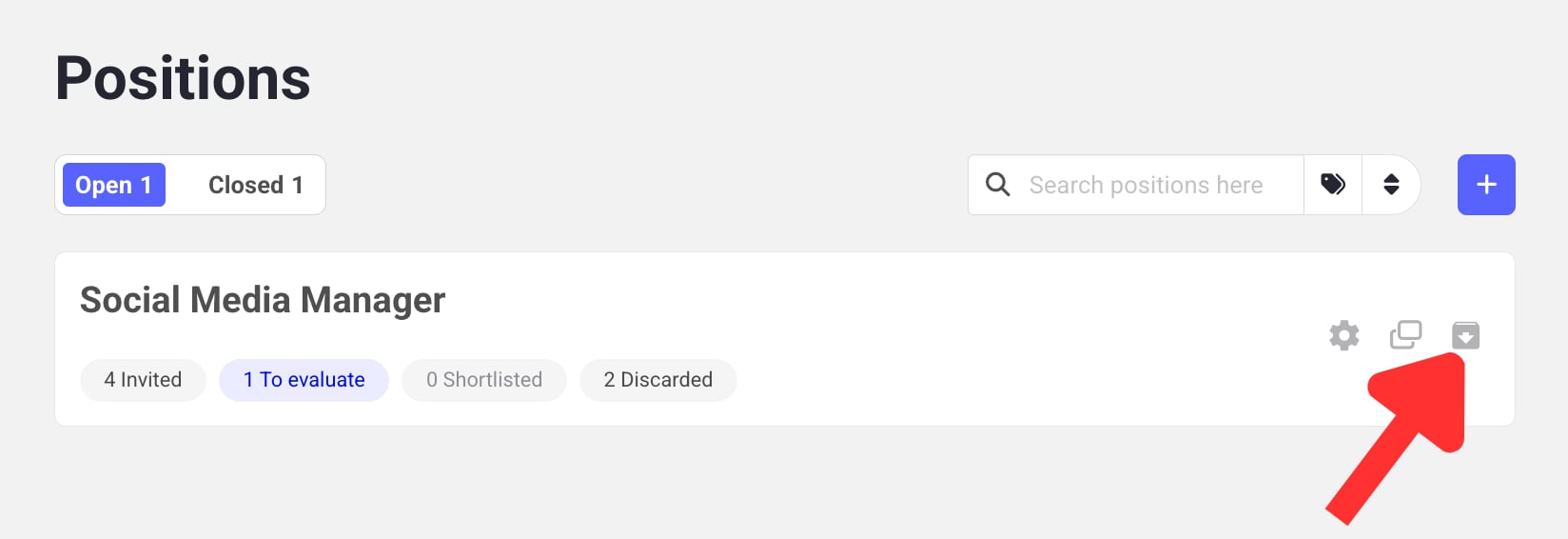
Open your Positions dashboard.
Click **Close** on the position you want to close.
Click **Closed** to see all the positions you've closed. From there you can:
* **Reopen** a position by clicking the **Open position** button, or
* **Permanently delete** it using the trash can icon.
If you reach your active job limit, closed positions can't be reopened until you close another active position to free up space.
Deleting a position is permanent. It can't be recovered, and you'd need to build it again from scratch. Make sure a position is really no longer needed before deleting it.
Learn how to build and tailor a video interview for your position.
## Steps
Open your Positions dashboard.
Click **Close** on the position you want to close.
Click **Closed** to see all the positions you've closed. From there you can:
* **Reopen** a position by clicking the **Open position** button, or
* **Permanently delete** it using the trash can icon.
If you reach your active job limit, closed positions can't be reopened until you close another active position to free up space.
Deleting a position is permanent. It can't be recovered, and you'd need to build it again from scratch. Make sure a position is really no longer needed before deleting it.
Learn how to build and tailor a video interview for your position.