> ## Documentation Index
> Fetch the complete documentation index at: https://hireflixsl.mintlify.site/llms.txt
> Use this file to discover all available pages before exploring further.
# How-to: Cloning a Job Position
## Overview
Cloning a job position creates an exact copy of it (questions, videos, tailoring, and messages), so you can reuse it without disturbing the original. It's useful when you want to:
* **Re-open a position** from scratch for a new hiring round.
* **Edit a position** after candidates have already been invited, since [some changes aren't allowed once candidates are pending](/user/jobs/editing-a-position).
 ## Steps
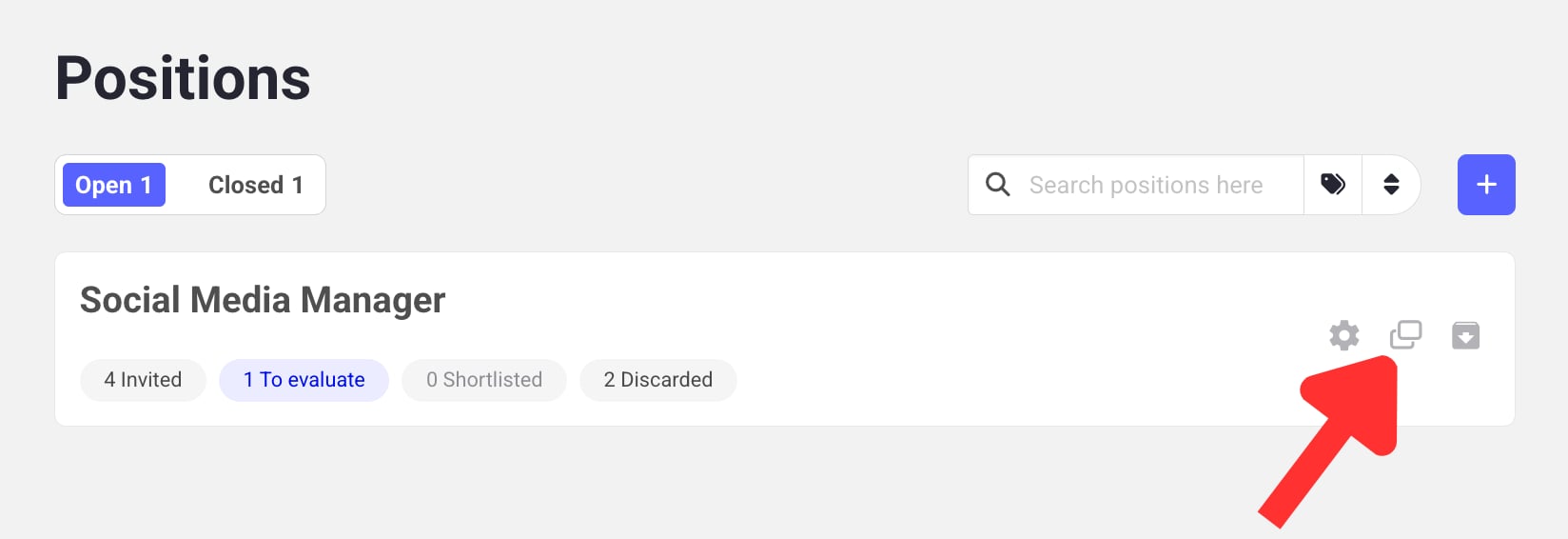
Find the position you want to clone in your Jobs list.
Click the **Duplicate icon** to clone the position.
The new position appears automatically, named **"Copy of..."**.
Remember to rename the copy. Candidates shouldn't see a position titled "Copy of...".
Learn how to close a job position once you're done hiring for it.
## Steps
Find the position you want to clone in your Jobs list.
Click the **Duplicate icon** to clone the position.
The new position appears automatically, named **"Copy of..."**.
Remember to rename the copy. Candidates shouldn't see a position titled "Copy of...".
Learn how to close a job position once you're done hiring for it.