> ## Documentation Index
> Fetch the complete documentation index at: https://hireflixsl.mintlify.site/llms.txt
> Use this file to discover all available pages before exploring further.
# How-to: Inviting Candidates One by One
## Overview
Inviting candidates one by one lets you add candidates to a job position directly from the Hireflix platform. Each candidate gets their own unique link to access the interview.
 ## Steps
Click on the position you want to invite candidates to.
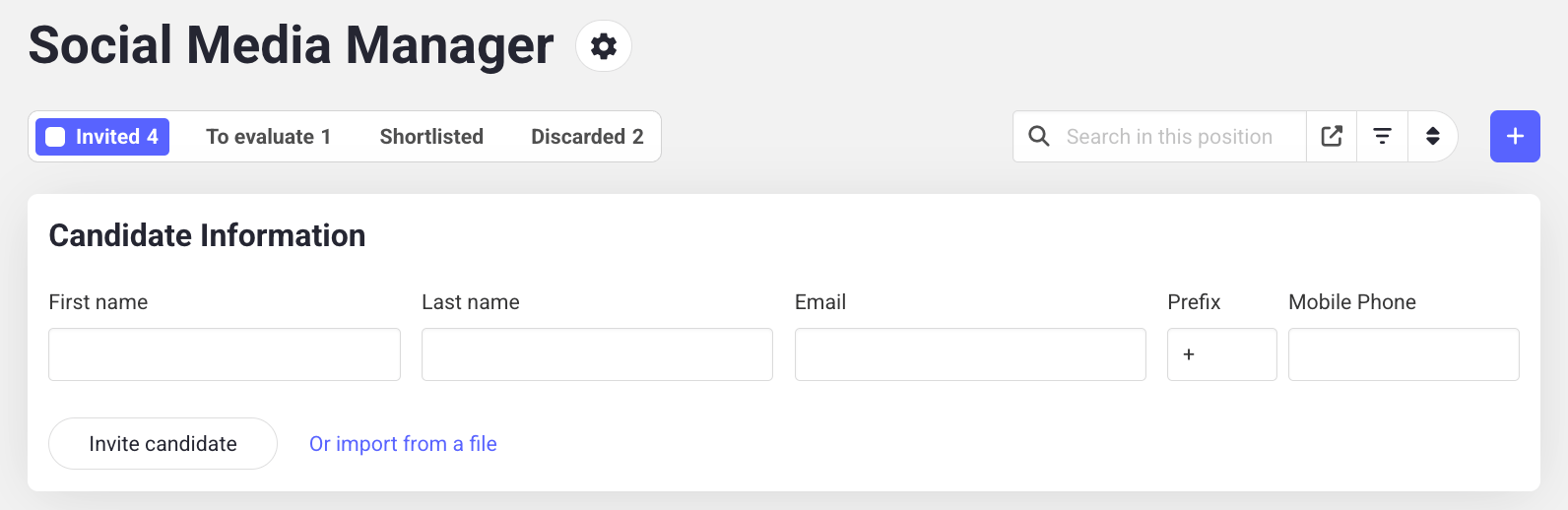
At the top, enter the candidate's **first name**, **last name**, **email**, and, optionally, **phone number**. A phone number is only needed if you want to send SMS messages, which we highly recommend.
Don't forget the country prefix when entering a phone number. Numbers must use the format `+X XXXXXXXXX` (e.g. USA: `+1 XXX XXX XXXX`, Spain: `+34 XXX XXX XXX`).
Click **Invite Candidate**. The candidate will receive an email with their unique interview link.
Inviting many candidates at once? Learn how to import candidates in bulk.
## Steps
Click on the position you want to invite candidates to.
At the top, enter the candidate's **first name**, **last name**, **email**, and, optionally, **phone number**. A phone number is only needed if you want to send SMS messages, which we highly recommend.
Don't forget the country prefix when entering a phone number. Numbers must use the format `+X XXXXXXXXX` (e.g. USA: `+1 XXX XXX XXXX`, Spain: `+34 XXX XXX XXX`).
Click **Invite Candidate**. The candidate will receive an email with their unique interview link.
Inviting many candidates at once? Learn how to import candidates in bulk.