> ## Documentation Index
> Fetch the complete documentation index at: https://hireflixsl.mintlify.site/llms.txt
> Use this file to discover all available pages before exploring further.

# FAQ: Can I Prefill Parameters to Public Interview links?

> How can I prefill candidate information in a public interview link.

export const UrlHighlighter = ({url = "https://app.hireflix.com/public-application/68b43e38b19cf131a17c543f?firstName=John&lastName=Benneth&email=john@gmail.com&phoneNumber=%2B32491505050"}) => {
  function ColorizedUrl({url}) {
    const {protocol, host, pathname, searchParams} = url;
    const params = Array.from(searchParams.entries());
    params[3] = ['phoneNumber', '%2B32491505050'];
    return <div>
        <span>
          {protocol}//{host}
          {pathname}
        </span>
        {params.length > 0 && <span>?</span>}
        {params.map(([k, v], idx) => <span key={k}>
            <span className="text-[#5863ff] font-semibold">{k}</span>
            <span>=</span>
            <span>{v}</span>
            {idx < params.length - 1 && <span>&</span>}
          </span>)}
      </div>;
  }
  const parsed = useMemo(() => {
    try {
      const u = new URL(url);
      const entries = Array.from(u.searchParams.entries());
      return {
        u,
        entries
      };
    } catch (e) {
      return {
        error: e && e.message || "Invalid URL"
      };
    }
  }, [url]);
  if (parsed.error) {
    return <div className="p-4 rounded-2xl bg-red-50 border border-red-200 text-red-800">
        Invalid URL: {parsed.error}
      </div>;
  }
  const {u, entries} = parsed;
  entries[3] = ['phoneNumber', '%2B32491505050'];
  return <div className="w-full">
      {}
      <section className="rounded-2xl border bg-white shadow-sm overflow-hidden">
        <div className="px-4 py-1 border-b bg-gray-50">
          <h2 className="text-sm font-medium text-gray-700">This link will open the public interview screen with all candidate details already populated.</h2>
        </div>
        <div className="p-4 font-mono text-sm whitespace-pre-wrap break-words">
          <ColorizedUrl url={u} />
        </div>
      </section>

      {}
      {entries.length > 0 && <section className="mt-6">
          <h3 className="text-sm font-medium text-gray-700 mb-2">Parameters</h3>
          <div className="flex flex-wrap gap-2">
            {entries.map(([k, v]) => <span key={k} className="inline-flex items-center gap-1 px-3 py-1.5 rounded-full bg-[#5863ff]/10 border border-[#5863ff]/30 text-[#5863ff] text-xs" title={`${k}=${v}`}>
                <span className="font-semibold">{k}</span>
                <span className="opacity-60">=</span>
                <span>{v}</span>
              </span>)}
          </div>
        </section>}
    </div>;
};

## When to use this

Hireflix supports two main ways to invite candidates to interviews:

* **Individual invitations** — where each candidate gets a unique, personal interview link.
* **Public links** — where everyone uses the same link to access the interview.

This feature applies to **public links**. Usually, candidates opening a public link must manually enter their name, email, and other details before starting the interview. However, if you already have this information (for example, collected through your own form or onboarding flow), you can **pass it directly through URL parameters**.

This saves candidates time, avoids input errors, and lets you seamlessly hand them off from your system or form to the Hireflix interview screen without requiring them to re-enter their details.

## How to use this

When you use the "[inviting a candidate](/features/interviews/inviting-candidate)" mutation, Hireflix returns two URLs:  a short and a public one. For example:

```
https://app.hireflix.com/31dah1DX
```

If you want to embed the interview in your own app or prefill candidate details automatically, you can transform this into a `public-application` URL like so:

```
https://app.hireflix.com/public-application/68b43e38b19cf131a17c543f?firstName=Michiel
```

Here’s what changed:

1. The URL path now includes `/public-application/` instead of the short link.
2. You use the **long-form interview ID** (returned when you invite a candidate or list interviews).
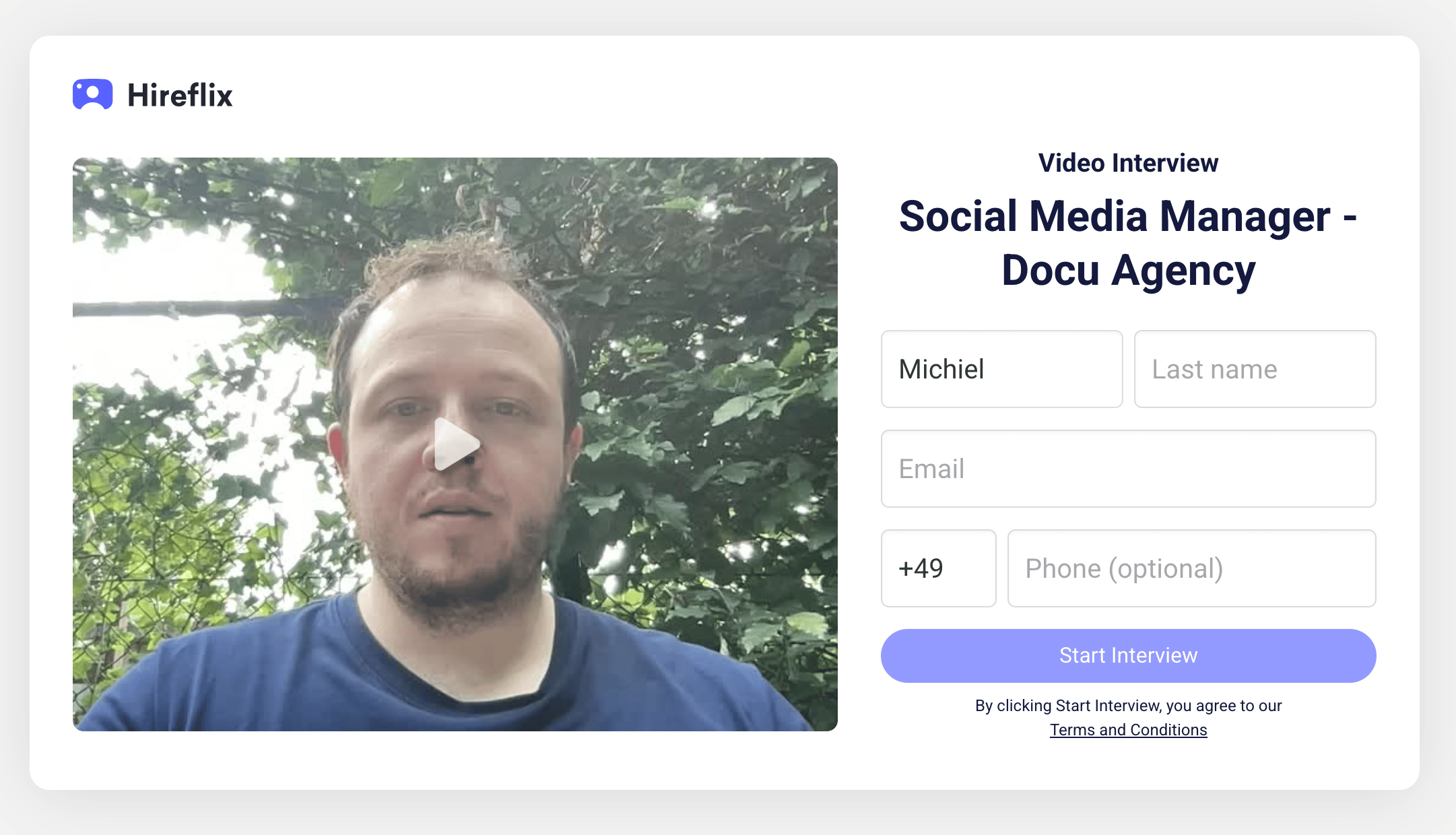
3. A query parameter (`?firstName=Michiel`) automatically fills the candidate’s first name field.

The result opens the interview welcome screen with the provided candidate name already filled in.

<img src="https://mintcdn.com/hireflixsl/-Zmd0FYI9GEpFIuo/images/interviewembeddedparameters.png?fit=max&auto=format&n=-Zmd0FYI9GEpFIuo&q=85&s=c0243dbb614026537c4b0e8edb3da296" alt="Interviewembeddedparameters Pn" width="2162" height="1240" data-path="images/interviewembeddedparameters.png" />

### Supported parameters

You can pass the following fields as query parameters to prefill the interview form:

| Parameter     | Description                                                                                                                                                |
| :------------ | :--------------------------------------------------------------------------------------------------------------------------------------------------------- |
| `firstName`   | Candidate’s first name                                                                                                                                     |
| `lastName`    | Candidate’s last name                                                                                                                                      |
| `email`       | Candidate’s email address                                                                                                                                  |
| `phoneNumber` | Candidate’s phone number (must include the country code and use `%2B` instead of `+`). A Belgian phone number `+32 491 50 50 50` becomes `%2B32491505050`. |

### Full Example

<UrlHighlighter />